
02 / SMALL SIGNS OF LIFE
Ambient critters in Godot:
a room that reacts.
A raven lifts off. Its neighbors follow. A quiet ledge becomes a small event. Here is how Mithraeum makes that happen.
Let the room remember the places. Let a small number of live nodes perform the animals. Give each animal a compact state machine, and let a manager handle activation, alarms and returns.
Mithraeum’s critters are ambient animals. They do not need health, combat hitboxes or a navigation agent. A raven can sit on a known ledge, hop within its bounds and fly away when the player approaches. A bat can hang under a roof, drop, then take flight. These reactions give movement a consequence without adding another enemy encounter.
The implementation has three main parts: Perch describes a usable span of room geometry; CritterField chooses locations and manages one species; Critter is a live Node2D with behavior and a visual. The game creates one field for each critter kind assigned to the room.
Room data + generated geometry
  └─ Perch records: ledges, lamps, roofs
      └─ CritterField: one kind, live budget
          ├─ Place: feet, lifecycle, cooldown
          └─ Critter (only while live)
              ├─ behavior state
              └─ Figure3D visual
TWO DIFFERENT STATE MACHINES
A place is asleep, live or fled. A live animal sits, hops, pecks, glances, flees, arrives, lands or drops.
The location can outlive the node that occupied it.
This field note follows merged source revision 3a708ee8e51e. The downloadable example rebuilds the management ideas with simple original shapes; it does not include Mithraeum’s models or rendering pipeline.
A small flock. Your next move.
Walk toward the ledge, or startle the nearest birds. One takeoff can travel through its neighbors. Then retreat and wait: a rearmed bird can arrive from the edge. Pan the camera separately to see how the room remembers places after their live animals are released.
CRITTER LAB / BROWSER TEACHING MODEL
Interactive model loadingROOM OVERVIEW Gold frame: screen · warm band: wake +100 · outer band: sleep +150 px
Approach the first ledge or startle nearby birds. Change the live budget to reset the flock with a different cap.
Recent state changes
- Nearby places begin live; the others remain asleep.
JavaScript enables the interactive scene. The guide, state descriptions, native Godot captures and downloadable project below remain available without it.
Click or drag in the scene to move the player, or use the sliders and buttons. With the scene focused, use ← / → and Space. The overview shows the camera and activation bands. A ring marks an alarmed bird; hollow points are places without live animals. Pause the lab or advance it one quarter-second at a time; reduced motion uses manual steps.
Original Canvas/JavaScript illustration of the companion demo’s logic, not an embedded Godot renderer or Mithraeum gameplay. The browser uses its own seeded random stream and fits its viewport to your screen. One species, explicit ledges, no collision or obstacle avoidance; like the teaching project, it uses shorter cooldowns than the game to make returns easier to inspect. The downloadable Godot project remains the native-engine example.
Start with geometry you already know.
Our rooms already have a grid. Perch.scan() walks it for contiguous standable runs with enough air above them. Solid rock, cracked slabs and one-way ledges can support a bird; slopes are excluded. Long runs split at region boundaries, keeping one large floor from behaving as one enormous perch. Roof scanning reverses the idea: find a solid underside, require clear space below, and optionally require a floor within reach so hanging animals can be seen from the playable area.
The field groups eligible ledges into regions and samples some without replacement. It then attempts positions along each chosen span, using width tiers and minimum spacing. A failed spacing attempt is discarded rather than retried: the configured count is a placement attempt, not a guaranteed flock size. Lamp tops are separate point perches. Bat nests use roof spans and clustered positions.
Selection also carries meaning. Doves can receive extra placement attempts in sunlight; bats prefer shade. The current implementation excludes the safe shop both when filtering a perch and when checking the final chosen feet position. That second check matters: a long perch can start outside the shop and extend into it.
ADAPT THIS TO YOUR ROOM FORMAT
A tile grid is not required. Hand-authored markers, generated platform segments or level-editor metadata can supply the same records: left edge, right edge, feet height and any habitat tags. Validate clearance and forbidden areas before making an animal node.
Placement gets a separate cosmetic random generator, derived from the run seed, room depth, room ID and species ID. It does not consume the loot or combat generator. That protects those streams from decorative random calls. Reproduction still depends on the engine version and call order; a seeded generator is not a complete deterministic replay system. Godot documents both seeded sequences and their implementation limits.
Make the camera boundary a band.
A place begins asleep. When it enters the activation rectangle and there is capacity, the field instantiates a critter. A sitting animal is released only beyond a larger rectangle. This gap is hysteresis: small camera movements at the activation edge do not repeatedly create and destroy the same bird.
# Excerpt from CritterField: the rectangle is in the room's canvas space.
var vp := get_viewport()
var seen := vp.get_canvas_transform().affine_inverse() * vp.get_visible_rect()
var active := seen.grow(def.window)
# Wake inside active; sleep a sitting animal outside:
var sleep_boundary := active.grow(def.window * 0.5)
All three current species use a 200-pixel window margin: wake within screen + 200; sleep a sitting critter beyond screen + 300. Match the coordinate space of this rectangle and the tested positions. This expression assumes the room’s canvas arrangement; if you use transformed parents or separate CanvasLayers, convert those positions too. See Godot’s canvas transform guide.
| Kind | Live limit | Rearm delay | Return policy |
|---|---|---|---|
| Raven | 8 per field | 10–20 s | Check every 5–9 s, below 3 visible sitting birds |
| Dove | 6 per field | 8–16 s | Check every 6–11 s, below 3 visible sitting birds |
| Bat | 6 per field | 20–40 s | Reoccupy the roof out of sight |
These are per-kind limits. A room containing ravens and bats can have both fields active. The counter bounds managed live animals; queue_free() releases nodes later in the frame. This implementation retains records and creates/frees nodes, rather than keeping a reusable pool of animal nodes.
It also still visits every place each physics tick. A live cap reduces active animal work, but does not prove a CPU, GPU or mobile frame-time budget. Profile your room sizes and renderer before deciding whether you need spatial indexing, less frequent dormant checks or pooling.
A small delay makes a shared reaction.
Each critter samples its own pace, flee distance and idle timers. Sitting animals can turn, glance, peck or hop; hops remain bounded by their known perch. Player proximity, a nearby hit or a waking foe can startle them. These checks use distance, without a line-of-sight query in this path.
When an animal takes off, it signals the field. The field schedules nearby sitting animals to flee after a short random lag. Those animals can then alarm their own neighbors. The raven’s radius is three hero heights and its lag is 0–0.18 seconds; bats use a wider radius and up to 0.35 seconds. This is a local alarm wave, not Boids separation, alignment and cohesion.
# Simplified teaching example; full implementation is in the download.
func alarm(delay: float, source: Vector2) -> void:
    if mode != Mode.SIT or alarm_in >= 0.0:
        return
    alarm_in = delay
    direction = -1.0 if source.x > position.x else 1.0

# Later, while ticking the animal:
if alarm_in >= 0.0:
    alarm_in -= dt
    if alarm_in <= 0.0:
        mode = Mode.FLEE
        startled.emit(position)
The guard is essential: a second alarm does not push an already scheduled departure further into the future. Scheduling also avoids recursively launching the whole flock inside one signal callback. In Mithraeum, the field uses the player as the escape reference when available, even when a neighbor raised the alarm. The teaching model instead points away from the alarm’s origin.
For bats, the state before flight is DROP. They let go of the ceiling, fall briefly while turning upright, then enter the flight state. Their proximity test also reduces the weight of vertical separation, allowing the player underneath to disturb a roof nest. One species-specific transition gives them a different character without a second manager architecture.
Give absence a lifecycle.
Fleeing birds build speed, curve and sway, shrink and tip. The game releases them after a continuous second outside the expanded screen window, or when their scale reaches zero. A departed place becomes FLED and receives a random rearm delay.
After that delay, an unseen place can become asleep again. A visible place follows a different route: if the field has capacity and too few visible sitting birds, a rearmed bird can fly in from beyond a horizontal screen edge. Perches too close to the player are rejected, avoiding an arrival that immediately becomes another escape. Bats skip visible fly-in arrivals and regain their roof out of sight.
A bird’s arrival uses a quadratic Bézier: a start beyond the edge, a lifted middle control point and the perch. Interpolate twice, then interpolate those results. Godot’s curve guide explains this construction.
var a := start.lerp(control, t)
var b := control.lerp(perch, t)
position = a.lerp(b, t)
The game advances the curve parameter using a control-polygon length estimate and slows it near landing. That is useful visual timing, not constant arc-length speed. It snaps to the exact endpoint, plays the landing clip and returns to sitting.
TWO DIFFERENT WAYS BACK
Offscreen: cooldown → asleep record → activation.
Visible: cooldown → capacity and safety checks → edge arrival → landing.
Resetting a visible record directly to sitting would skip the movement that makes its return believable.
Separate behavior from the way it is drawn.
Mithraeum’s live animal is a Node2D, while Figure3D supplies its animated visual. Ravens and doves use room-authored silhouette colors, with a separate far-wing tone and optional eye accent. The flat-shading override gives the tiny shape a controlled value structure. Bats retain their shaded treatment. The current raven and dove figures use a 90-degree viewing yaw; flight adds a 60-degree bank, eased into place, so their wings read. The code also supports a flight-specific yaw override.
That rendering route is specific to the game. You can attach the same place/field/animal split to an AnimatedSprite2D, a small skeleton or a simple shape. First make the perch and takeoff recognizable at the actual display size; more texture will not repair a confusing outline.
Motion tuning needs units too. The game scales many distances and speeds by hero height and uses delta for manual movement. Several damping factors convert a 60-Hz retention factor into elapsed time:
# Keep retention_per_step of the difference each 1/60 second.
var retention := pow(retention_per_step, delta * 60.0)
value = lerpf(target, value, retention)
This makes that decay comparable over elapsed time at different update rates. It does not make every random decision, integration step or animation fully rate-independent. Godot’s processing guide explains physics updates and elapsed-time movement.
A small flock, with the machinery visible.
GODOT 4.7.2 / MIT-LICENSED TEACHING PROJECT
24 remembered places. Six live birds.
Original shapes; no plugins, sound or game assets.
Open project.godot and run the main scene. Use Left/Right to approach and pan, Space to alarm nearby birds, and R to reset the seed. Watch the live counter while leaving a flock behind. Wait after a departure: a sufficiently distant visible perch can receive a returning bird.
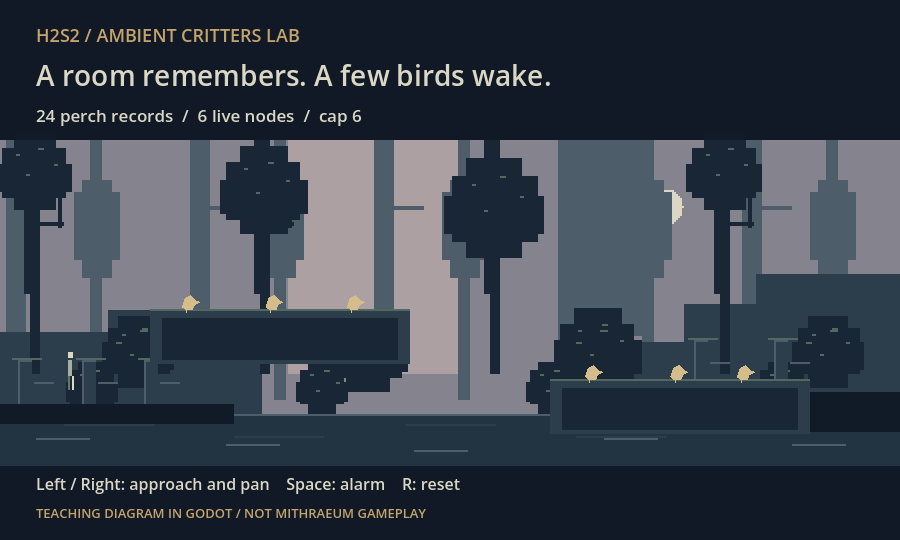
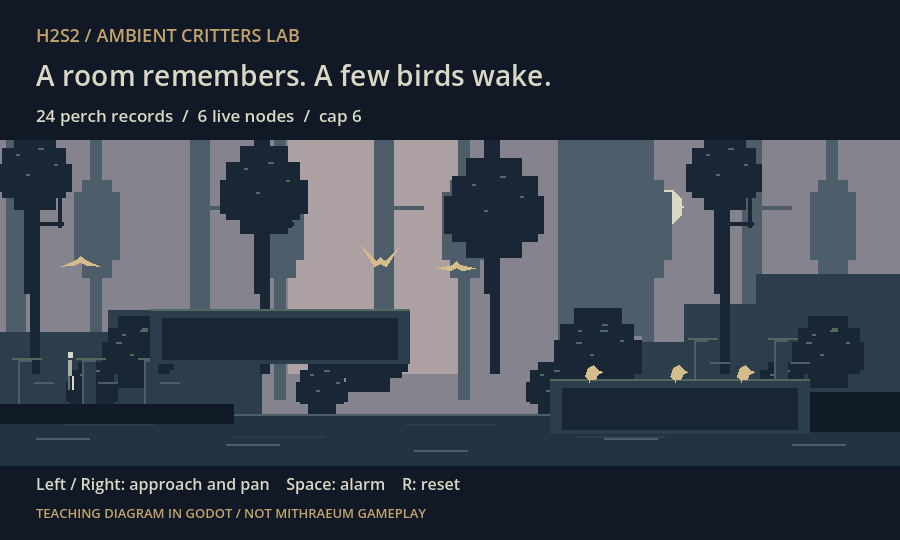
The demo was tested with 4.7.2.stable.official.ed1daf0bf. These images came from the macOS Compatibility/OpenGL renderer. Its headless test checks seeded placement, the live cap during departure, camera-edge hysteresis, alarm idempotence, invisible rearming, arrival endpoints and damping at 30/60/120 steps per second.
godot --headless --path . --script test_lab.gdRead main.gd in order: Place, Bird, then the manager’s tick(). Change LIMIT or MARGIN and watch the boundary behavior. Add another independent field before attempting new species behaviors.
This example deliberately uses explicit ledges, a single species, three animal states and a fixed flight lifetime. It omits the game’s grid scanner, safe-shop checks, combat events, bats, hop/peck/landing clips, low-population return threshold and Figure3D. It demonstrates the architecture; it is not a complete extraction of the game system.
Before you add a flock.
Do ambient birds need CharacterBody2D?
Only if your design needs its collision behavior. Ours decorate known perches and leave without blocking anything, so a Node2D and manual motion are sufficient. Flying through the level is a visual effect here, not obstacle-aware pathfinding.
Is this node pooling?
No. The game retains place records but creates and frees live critter nodes. Pooling would reuse those nodes and require a reliable reset contract.
Why not make the whole flock a particle effect?
Particles suit many ambient effects. Here, individual perches, idle actions, proximity reactions and arrivals are useful persistent relationships. Small live nodes make those relationships explicit.
What should I test first?
Oscillate the camera around an activation edge. Trigger the same alarm repeatedly. Depart while the live budget is full. Revisit after cooldown. Check that safe areas stay clear, a returning bird lands exactly on its perch, and your drawing remains legible at game scale.
What this guide is based on.
Code study: merged Mithraeum revision 3a708ee8e51e7d48438b31334cea4a73356b5a29, examined November 2, 2026. The relevant game files are systems/world/critters/perch.gd, critter_field.gd, critter.gd, data/critters.json, systems/core/rng.gd, systems/actors/figure/figure_3d.gd and systems/render/shaders/flat3d.gdshader under game/.
The code and its design notes identify Dead Cells as a behavioral and visual reference. This article describes H2S2’s implementation and original teaching example; the download contains no third-party game code or artwork.
- Godot 4.7: RandomNumberGenerator — seeded sequences and implementation limits.
- Viewport and canvas transforms — keeping coordinate spaces consistent.
- Béziers, curves and paths — quadratic interpolation.
- Idle and physics processing — update timing and delta.
- Node.queue_free() — deferred deletion.
Technical checks cover the companion demo, not the full Mithraeum test suite. The game’s existing critter capture route and safe-shop regression were inspected, not executed for this article. No frame-time, battery or phone benchmark was collected. The research does not measure search volume or establish Reddit demand for this topic.
Author: H2S2 Studio. Technical preparation and source review: Codex, November 2, 2026. Technical review information and evidence are recorded above. Download the demo and capture evidence record.